 Chimy
Which photos and messages do you need from a customer to quote over WhatsApp?
Short answer
Ask for three photos: an overview, a close-up of the problem and one with something of known size next to it, plus a short description of what, where and when. That is often enough for an indication without a visit. A voice note is easy for the customer to send, but it takes you time to listen to.
Why a photo is often enough for a first indication
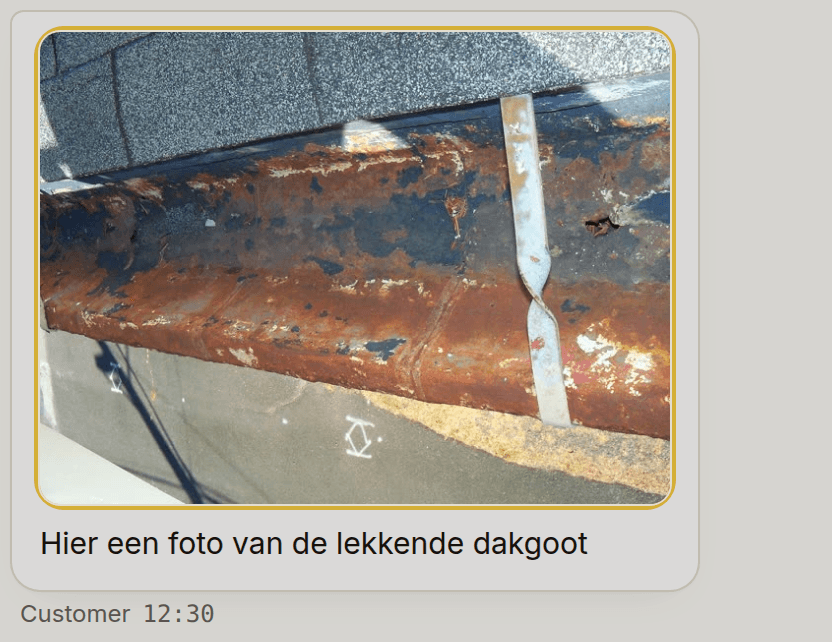
A customer who says the tap is leaking tells you little. A photo shows which type of tap it is, how old and where the water comes from. That saves a round of messages and sometimes a whole visit.
A photo does not replace looking on site. For a big job, or when you cannot see something, you still book a survey or a visit. But for many small jobs, two or three good photos are enough to give a price indication or a first appointment.
Which photos to ask for
Customers often send one crooked photo taken in the dark. Ask for a few specific shots instead, and say a phone is fine and that lights on help.
- An overview of the room or spot, so you see where it is and what surrounds it.
- A close-up of the problem or the part, for example the type plate, the crack or the spot of the leak.
- A photo with a measure in it: a folding rule, a sheet of A4 or a familiar object next to the spot, so you can estimate sizes.
- For a broken appliance or part: a photo of the label with brand and type.
Which questions go with it
A photo without context is still guessing. Ask in words what is wrong, where it is (postcode or town), when it suits and how urgent it is. Also ask whether there is something you cannot see, such as an earlier repair or a floor above. Keep it to four or five questions; a customer who sees a long list drops out.
Voice notes: easy for the customer, different for you
Many customers prefer a voice note to typing, especially when they are on a roof or in the car. Take that seriously: at least they send you something. You can play it on the road.
For you, a voice note is slower than reading. You cannot skim it or search it later. So when a customer sends only a voice note, politely ask for a short summary in text: what, where and when.
What Chimy does with photos and voice notes
Photos and voice notes work while you have credits. Chimy's assistant asks in the conversation what needs doing, where and when, and how urgent it is, and tells the customer that photos are welcome. When the customer sends photos, the assistant looks at the newest two, repeats briefly what it sees and notes that on the request. It makes no hard diagnosis and no price promise based on a photo. It names a price only as an indication, and only when it is in your guide prices or price list.
You see the photos in the conversation. We resize them and remove the location data: otherwise a photo of a kitchen carries the place where it was taken. Photos and voice notes are deleted together with the conversation after twelve months.
A voice note is stored and you can play it in the conversation. The assistant does not read or understand it. When a customer sends only a voice note, the assistant politely asks whether they can type it in short. If a photo cannot be downloaded, the conversation shows only '[foto ontvangen]', with no photo. So do not go looking for a photo that is not there.
You start once with Starter for €49 incl. VAT, with 10 credits. After that you top up credits when you need them, for example 10 credits for €25. A Chimy number of your own is optional, for €15 a month. There is no subscription. All prices include VAT.
Frequently asked questions
How many photos should I ask for?
Two or three is enough: an overview, a close-up and one with a measure in it. More photos without explanation help little. Chimy's assistant looks at the newest two photos in a conversation.
Can I quote from a photo?
For an indication often yes, for a fixed price usually not. If you cannot see something, book a visit. Chimy's assistant makes no price promise from a photo and names only prices from your guide prices or price list, as an indication.
Can I play customers' voice notes?
Yes. A voice note is stored with the conversation and you play it there. The assistant does not read or understand it; when a customer sends only a voice note, it asks whether they can type it in short.
What happens to the location in a photo?
A phone photo can contain the place where it was taken. Chimy removes the location data from photos. Photos and voice notes are deleted together with the conversation after twelve months.
Does this work without credits?
No. Without credits Chimy takes no leads, so no photos or voice notes are stored either.
Other guides
- When should an AI assistant hand over to a human in a small business?
- How do you set up an AI assistant with a price list and a will-not-do list?
- Booking software or an AI assistant on WhatsApp: which to choose?
- Build your own WhatsApp bot, or use a ready-made AI assistant?
- Answering service, voicemail or AI assistant: what is the difference?
- How do you follow up contact form enquiries quickly on WhatsApp?
- What does a missed call cost you each month?
- How do you forward calls you don't answer to another number?
- How fast should a small business reply to a new enquiry?
- Emergency jobs as a plumber: what do you set for your WhatsApp assistant?
- How do you ask customers for a review on WhatsApp?
- Can you start with a WhatsApp assistant if you have no website?
- How can you schedule an appointment in WhatsApp?
- How do you cut no-shows with a WhatsApp appointment reminder?
- What is the WhatsApp Business API, and does a small business need it?
- WhatsApp chatbot for a small business: what it can and cannot do
- What is the WhatsApp 24-hour window and what does it mean for your business?
- How do I make a WhatsApp QR code or link for my business?
Start with your WhatsApp number
This opens WhatsApp with a ready-made message. Send it and we'll handle the rest in WhatsApp.
Start on WhatsApp
Scan the QR code with your phone's camera.
- Open the camera app on your phone and point it at the code.
- Tap the WhatsApp notification or link that appears. WhatsApp opens with the message already typed.
- Send the message. Chimy takes it from there in WhatsApp.